Changing clothes
Most kinds of items can be equipped using the ID box at the top of the panel. Simply paste an ID into the box, press Wear and the panel will automatically figure out how that item should be equipped. The input box on the top of the panel supports:
- shirts
- pants
- t-shirts
- accessories
- animations
- bundles
- 3D clothing
- body parts
- faces
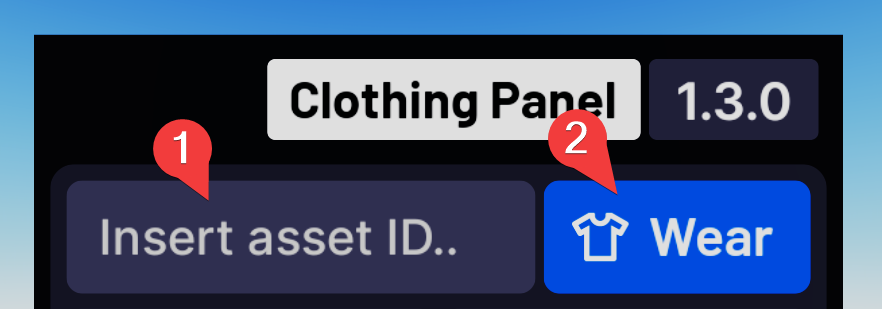
When you equip a clothing item like a shirt or pants, including 3D clothing, the current one you wear will be replaced with the new one, except for 3D pants, because most 3D shoes on the marketplace are technically pants, so to allow for both 3D shoes and 3D pants to be worn at the same time, there's no limit to how many 3D pants you can equip at once. Remember that the order you equip 3D clothing in matters when it comes to layering.
Skin colour
To change skin colour, press the Skin colour button and select a skin colour of your choice from the provided list. The colour of all body parts will be changed at once. Currently, there is no way to change the colour of an individual body part by using the panel, the selected option will apply to your whole character.

Body scale
In the Body scale menu, you can customise your character's width, height and depth, as well as the size of the head. You can use the value boxes to set the scale to a specific value, for example 50%. You can also press the Refresh button (circular arrow icon) to reset a specific slider back to 100%, or press the Reset all button on the top to reset all of the sliders' values.

Emotes
You can equip emotes in the Emotes menu. Select the emote slot you want to replace and insert an emote ID.

Removing clothes
To remove clothes or accessories, press the Remove button. You can use the trash can icon next to each clothing item to remove it from your avatar, or you can press Remove all on the top to remove all items.

Refreshing your character
You can refresh your character by pressing the Refresh button. This will respawn you and reset your appearance, while keeping your position in the game and the tools in your inventory.