5. (Optional) Whitelist the panel
At the moment, only saving and loading recordings can be whitelisted. We are planning to make every action on the panel whitelistable in the next StacyPilot update.
StacyPilot can be whitelisted, so only allowed users can save and load recordings. To do that, open the Settings script and edit the Admins setting.
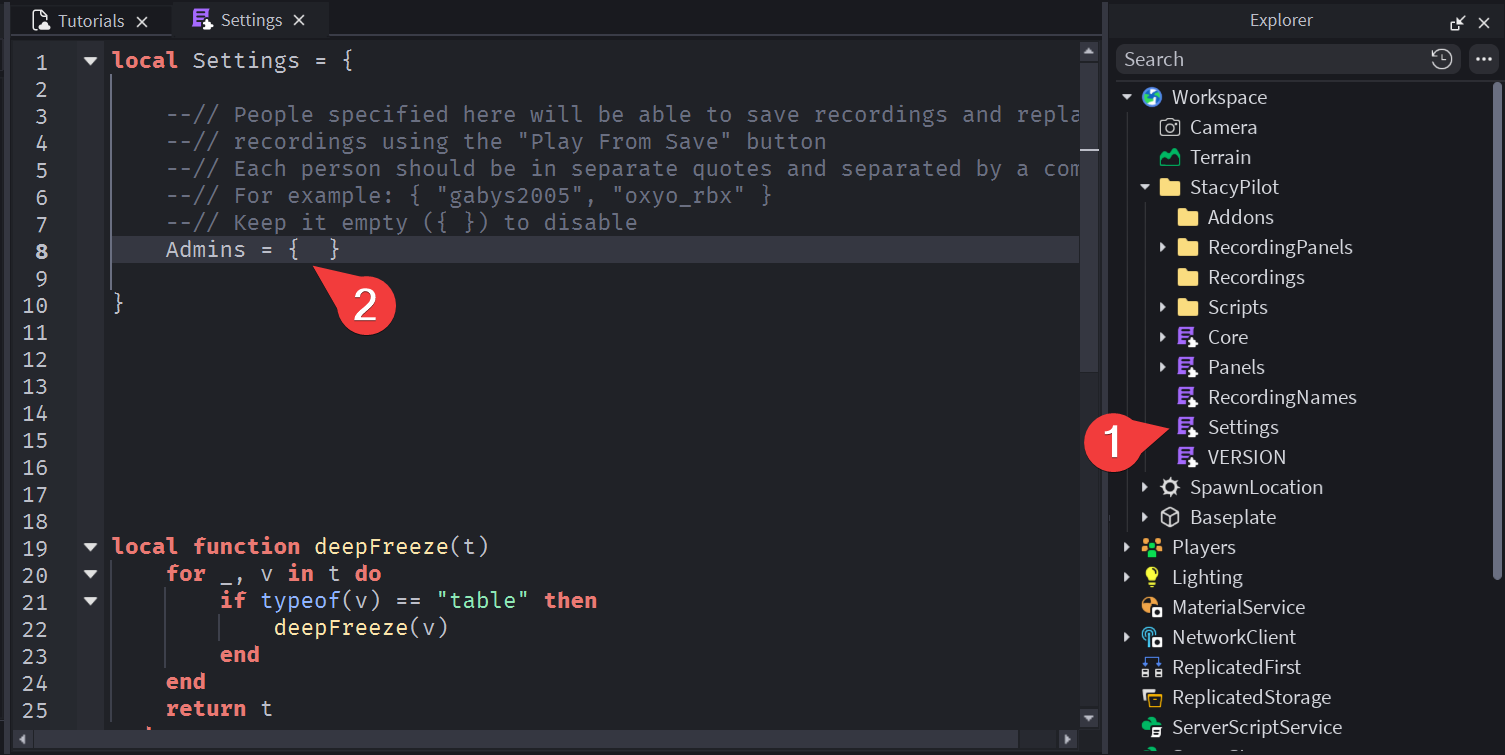
By default it looks like this:
Admins = { }
This indicates an empty whitelist, and an empty whitelist means that it's disabled entirely.
The whitelist is disabled by default.
You can add players to the whitelist by editing that setting. There are a couple rules you should follow when adding players:
- Each player's username should be in their own quotes
- Each username should be separated by a comma (,)
- You should use usernames, not display names
- Usernames are case-sensitive,
stacyandSTACYare not the same
For example, if you want to whitelist 3 players: gabys2005, idezye and GiorgioworldcupTEMP, the setting would look like this:
Admins = { "gabys2005", "idezye", "GiorgioworldcupTEMP" }
Roblox will show you orange or red lines in the code editor if you do something incorrectly here.