Frequently asked questions
This page answers some commonly asked questions about GLights.
Why are GLights meshes so ugly?
More detailed meshes have an impact on performance. GLights' goal is to run well on as many devices as possible and simpler meshes make it easier to run the game. If you really want to use more detailed meshes, you can replace the default ones or add custom models, but you should first ask yourself if players will even be able to see the light models in the dark.
The buttons on my panel turn white when I start the game!
If your buttons turn white once your game starts, then you probably changed something and GLights can't load properly anymore. Try reverting the changes you made. You can also check the output for more information.
GLights work in Studio but not in the game
To the best of our knowledge, this is caused by virus scripts in your game. Try to look through scripts in your game and delete or disable any that don't really have a reason to be there. In the cases we were able to verify ourselves, the problem was caused by a script pretending to be qPerfectionWeld, and a script named EffectBuilder, so that might be a place for you to start.
How do I add custom cues?
We are planning to overhaul our cue system in a future update, so we haven't officially released any custom cue documentation yet. You can look at existing cues to see how their scripts should be written (the scripts are in the Cues folder), however please be aware that custom cues might break in future updates until we officially announce them.
The meshes are distorted!
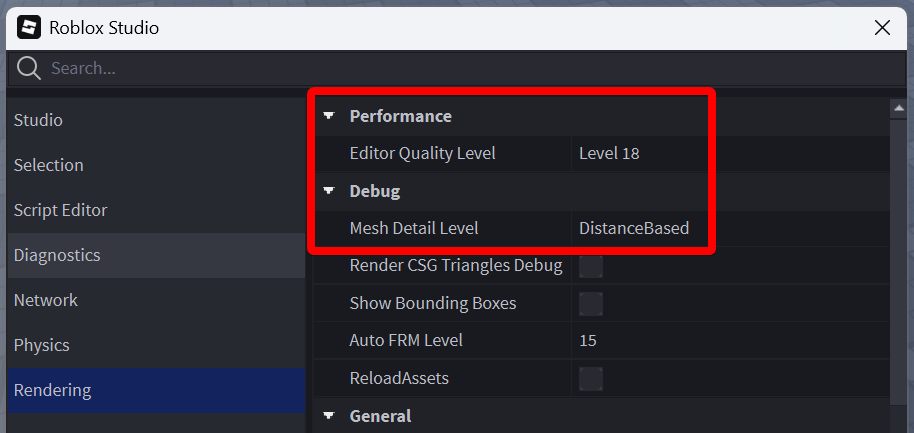
GLights meshes are put into performance mode, meaning they will distort when needed to get more performance. You can sometimes see distorted meshes in Studio, to fix them, increase your graphics quality. Press Alt + S on your keyboard to open the settings, go to the Rendering tab and set Mesh Detail Level to DistanceBased or Level 00. Note that Level 04 is actually the lowest quality. You can also try increasing Editor Quality Level.
How to record / timecode GLights?
You can use StacyPilot for that. This page explains everything you need to know.
How do I use follow spotlights with NPCs?
In short, add an ObjectValue to the FollowPoints folder and set its value to your npc. A more detailed explanation is available here.
Why are custom models broken in GLights 6?
GLights 6 changed which way the default meshes are facing. If you used custom meshes in GLights 5, then they will simply not work with the default GLights 6 motors. You can follow this guide to learn how to add custom models to GLights 6. Most of the stuff in it is not important, but you should focus on the AddMotors function. It generates the motors used by lights. Just play around with the numbers there until it works correctly.
How do I update GLights?
You can use the GLights plugin to quickly update GLights 5 or old versions of GLights 6. You can find more information about the plugin here.